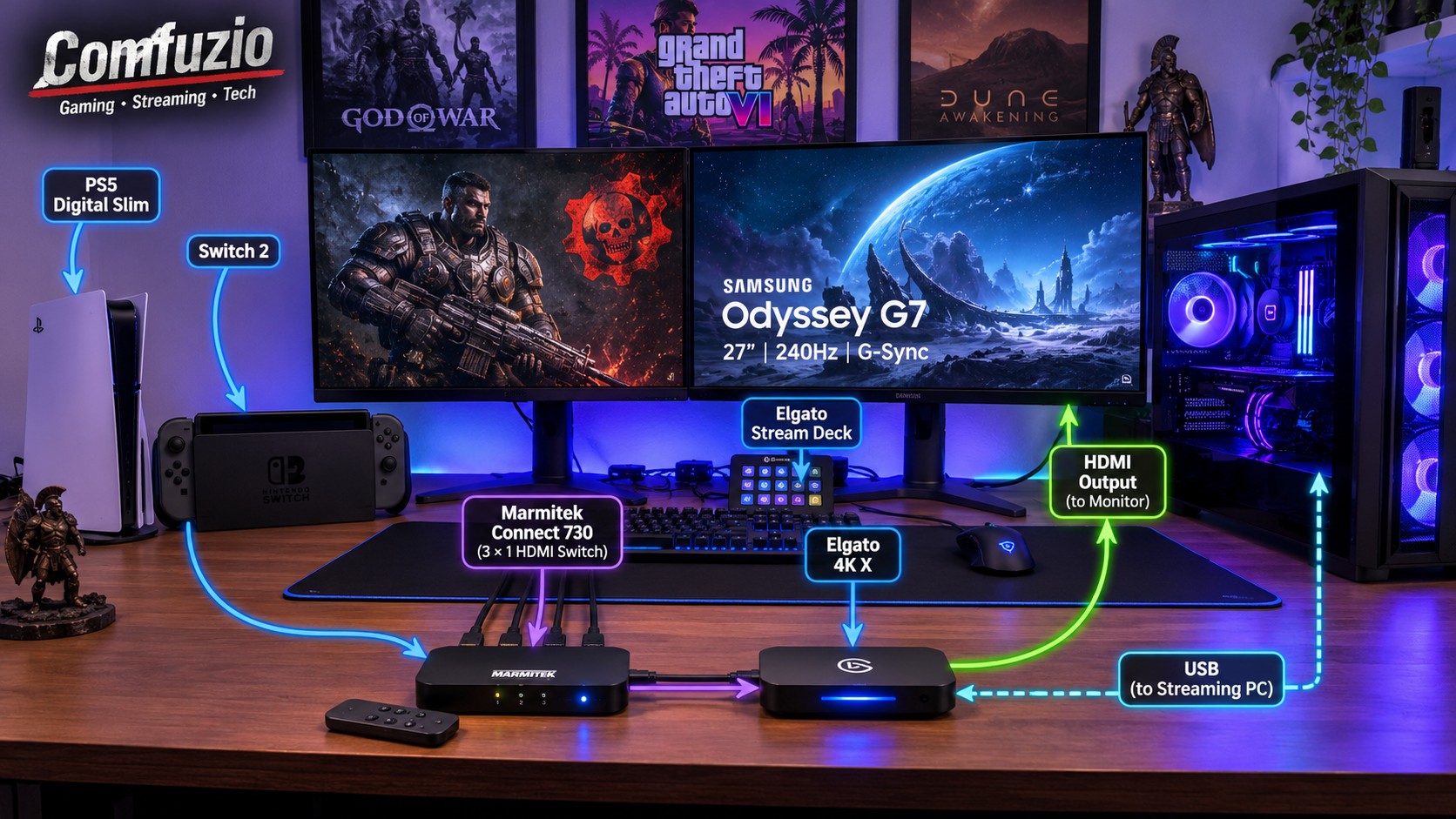
One of the most annoying things about having multiple gaming platforms isn’t necessarily finding enough space for them. It’s connecting everything properly without turning your desk into a cable-management nightmare.
If you own multiple consoles, a gaming PC, a capture card and a high-refresh-rate monitor, you probably know exactly what I’m talking about.
I wanted a solution that would allow me to switch between my PlayStation 5 Digital Edition Slim and Nintendo Switch 2 without constantly unplugging and reconnecting HDMI cables. More importantly, I wanted to keep my streaming setup as straightforward as possible, without sacrificing image quality or convenience.
Enter the Marmitek Connect 730 HDMI Switch and the Elgato 4K X.
The HDMI Switch: Marmitek Connect 730
The Marmitek Connect 730 is an HDMI 3×1 switch, meaning it provides three HDMI inputs and one HDMI output.
In practical terms, I can connect up to three different HDMI sources and send their signal through a single output. Instead of manually changing cables every time I want to play something different, I simply use the included remote control to select the input I need.
My current configuration includes:
- PlayStation 5 Digital Edition Slim
- Nintendo Switch 2
- One spare HDMI input for another device in the future.
That’s it. No cable swapping, no crawling behind the desk, and no unnecessary interruptions when switching platforms.
The Connect 730 is advertised with support for HDMI 2.1, 8K at 60Hz and 4K at up to 240Hz. However, there’s something worth mentioning here: although both the Marmitek website and the Skroutz product listing advertise 4K 240Hz support, the packaging itself doesn’t explicitly mention that specification.
I’ll have to investigate this discrepancy further before treating that particular capability as confirmed.
Capturing Everything: Elgato 4K X
Of course, switching between consoles is only half the story. Since this is also my streaming setup, I need a reliable way to capture their output.
That’s where the Elgato 4K X comes in.
The capture card receives the HDMI signal from the Marmitek switch and provides the video feed to my streaming PC through USB, allowing me to capture and broadcast gameplay through OBS Studio.
Its HDMI passthrough also allows me to connect my gaming display without having to rely on the OBS preview window for playing games.
This is particularly important because nobody wants unnecessary input latency or a compromised gaming experience just because they’re streaming.
The idea is simple: play on the actual monitor, capture the gameplay independently, and let OBS handle the broadcasting.
The Display: Samsung Odyssey G7 27″
Everything eventually reaches my Samsung Odyssey G7 27-inch monitor.
With its 240Hz refresh rate and G-Sync support, it’s an excellent display for my gaming setup.
Naturally, neither the PS5 nor the Nintendo Switch 2 is going to take full advantage of a 240Hz refresh rate in the way a powerful gaming PC can. Nevertheless, having a single display for multiple gaming platforms makes considerably more sense than having separate monitors for everything.
And that’s precisely the point: convenience without unnecessarily complicating the setup.
How Everything Connects
The signal path is relatively straightforward:
PS5 Digital Slim / Nintendo Switch 2 / Future HDMI Device → Marmitek Connect 730 → Elgato 4K X → Odyssey G7
The Elgato connects to the streaming PC over USB, while its HDMI passthrough sends the video signal to the monitor.
The result is a setup where I can change consoles using a small remote control, capture gameplay through Elgato, and keep my gaming display connected without constantly touching the cables.
No unplugging, no reconnecting, no unnecessary hassle.
Want to Build Something Similar?
If you like this approach and want to replicate it, these are the two main accessories I’d recommend looking into:
- Marmitek Connect 730 HDMI Switch 3×1: Search for the exact model on Skroutz or visit the official Marmitek website. Make sure you’re looking at the Connect 730 and not a different HDMI switch.
- Elgato 4K X: Available through Elgato’s official website and various electronics retailers.
You’ll also need suitable HDMI 2.1 cables for your intended resolution and refresh rate, as well as a compatible USB connection for the capture card.
One important consideration: don’t buy an HDMI switch simply because it advertises 8K or 4K support. Check the actual bandwidth, refresh rates, HDR, VRR and HDCP compatibility against the devices you intend to connect. The specifications that matter are the ones your complete signal chain can actually support.
Final Thoughts
Sometimes the best upgrades aren’t necessarily more powerful hardware or another expensive gaming peripheral. Sometimes they’re simply the things that make your existing equipment work together better.
The Marmitek Connect 730 has made switching between my consoles considerably easier, while the Elgato 4K X takes care of capturing the gameplay for my streams.
It’s a relatively simple addition to a gaming and streaming setup, but one that removes a surprisingly annoying inconvenience.
And honestly, being able to switch between consoles with a remote control instead of playing hide-and-seek with HDMI cables behind my desk is an upgrade I can appreciate.